
Chris Richard
DevOps, SRE, Music & More
Skills
What I'm thinking about...
Evolving my Agentic Dev Stack (and Net Worth)
Jul 18, 2026Enterprise engineering is mostly the art of waiting: waiting for security reviews, waiting for product managers to ‘align’ on error budgets, and waiting for the council of elders to interpret the omens for a routine CAB approval. It is an elaborate safety theater that is empirically broken, as years of DORA research have proven.
Stepping into a personal project with modern local agentic tooling is the antidote. There are no incident response pagers or post-mortems here. It’s just you, a local agent, and the raw velocity of building without asking for permission. The psychological ROI alone is worth more than your average quarterly bonus.
More than that, it has changed how I solve my own problems. Instead of immediately shopping around for a SaaS subscription to optimize a process or manage a personal pain point, I build the software myself. With tools such as Google’s Antigravity or Anthropic’s Claude, an experienced solo engineer can stand up tailored tools that fit specific constraints perfectly. I design it exactly for my workflow, with the luxury that if a feature is missing I build it, usually within a matter of minutes.
Here is how I actually build software today when running a solo sandbox, and how I used harnessed agents to solve my own investment analysis paralysis.
The Catalyst: “Hope is Not a Strategy”
Earlier this year, I transitioned my managed investments into a self-managed portfolio. Gaining control of your own asset allocation is a mixed blessing. You have no problem saving money, but applying that cash to specific assets in a volatile market is a quick route to analysis paralysis. I’m not a financial advisor, and to quote a decades-old military maxim popularized by the Google SRE book, “hope is not a strategy.”
Generic retirement calculators tell you to buy index funds and pray. Traditional robo-advisors charge fees to do basic arithmetic. I wanted a private, localized tool that could offer me tailored advice based on up-to-the-minute data. I wanted the tool to take my exact balances, factor in complex personal constraints like my spouse’s defined benefit pension floor, and integrate with other data sources like my budgeting tool, YNAB. No SaaS could offer me this level of customization. I had to BECOME the SaaS.
Some may call this a glorified spreadsheet. It is, but it’s a spreadsheet that runs on a local SQLite database, syncs securely from my active browser session, and uses an LLM API to filter the noise into three plain-language actionable suggestions. More importantly, it was an excuse to build a local-first application and continue evolving the ways I safely co-author code with a terminal agent.
Multi-Level Guardrails: System vs. Project Rules
I knew going in that I would be depending on agents for this project. Giving an autonomous agent terminal and file access on your local machine is inherently risky. To make this work safely, you need guardrails at different levels:
- System-Level Guardrails (The Harness): I enforce global rules on what any agent is allowed to do. Most importantly, I block Git write permissions. The agent can read
git difforgit status, but under no circumstances is it allowed to executegit commitorgit push. This isn’t about simulating an enterprise CI/CD pipeline locally; it’s simply about keeping the agent from muddying my commit history with experimental junk. - Project-Specific Guardrails (
AGENTS.md): Different projects have different framework quirks. For the investment planner, I checked in a project-levelAGENTS.mdfile containing stack rules. For example, Next.js releases breaking changes faster than LLMs retrain. The file warns the agent: “This is not the Next.js you know. Conventions may differ from your training data; read the docs innode_modulesbefore writing code.” This grounds the model in local reality instead of hallucinating outdated APIs. - Data Anonymization (PII Scrubbing): Even though the local app queries a cloud LLM API, no identifying financial information ever leaves my machine. The prompt engine strips trailing account numbers (e.g., transforming
TFSA (*3100)to a genericTFSA), excludes real names or Social Insurance Numbers, and uses rounded, approximate values for tax brackets and contribution limits. The LLM gets the structural math; it never gets my identity.
The Agentic Loop: How I Build Software Now
I didn’t build this project by copy-pasting code blocks from a browser chat window. I built it entirely from the terminal using a single agent harness: Antigravity. Instead of hopping between tools, I orchestrated different models (Gemini Pro for strategic planning, Claude Sonnet for code edits, and Gemini Flash for operational tasks) under a unified CLI development loop:
- Plan & Question (The Blueprint): Before writing a line of code, I run planning sessions with the agent. We debate the SQLite schema layout and map security boundaries. The agent queries my files, and we iron out edge cases in the database snapshots before we ever touch a file.
- Build: I delegate the bulk boilerplate to the agent. It stands up the Prisma models, generates Next.js server actions, and builds the browser extension structure.
- Test: The agent runs commands directly in my terminal workspace. It runs database migrations, starts the dev server, and watches the build. If a compilation error pops up, the agent catches the logs and fixes the code in a tight loop.
- Review & Refactor: I act as the final code reviewer. I inspect the git diffs generated by the agent, point out logical discrepancies, and have it refactor the code until it’s production-ready… even though it will only ever run on my machine.
Data Harvesting via a Local Browser Extension
A major roadblock for personal finance tools is data retrieval. Legacy banks don’t have public developer APIs. Your options are usually giving your credentials to a third-party data aggregator, or writing a headless Selenium script that triggers 2FA alerts every Tuesday.
I used the AI stack to build a third option: a lightweight browser extension that runs entirely locally.
When I log into my brokerage account and click the extension’s dynamically-appearing button, a content script grabs the native Javascript state variables that the site has already loaded in my active session. It sends a POST request with the raw JSON payload directly to the local app’s /api/sync endpoint.
// content.js - Running locally in my browser session
const portfolioData = window.wrappedJSObject.portfolioData;
fetch('http://localhost:3000/api/sync', {
	method: 'POST',
	headers: { 'Content-Type': 'application/json' },
	body: JSON.stringify(portfolioData)
});
The CLI agent generated the extension structure, manifest, and API receiver route in minutes. It’s secure, private, runs on localhost, and gets the data securely because it piggybacks on my own manual login.
Is it brittle? Absolutely. The moment the brokerage updates their frontend state structure, the content script will break. In a personal sandbox, I am the only user, the only SRE and the SLA is entirely subjective. The trade-off is worth it to keep my credentials and net worth data restricted to localhost.
Evolving Prompts as Code
The core of the application is the (currently) Claude-powered advisor widget. In plain terms: I shove a giant JSON dump of my net worth into the model API and ask it to give me back exactly three trades in priority order.
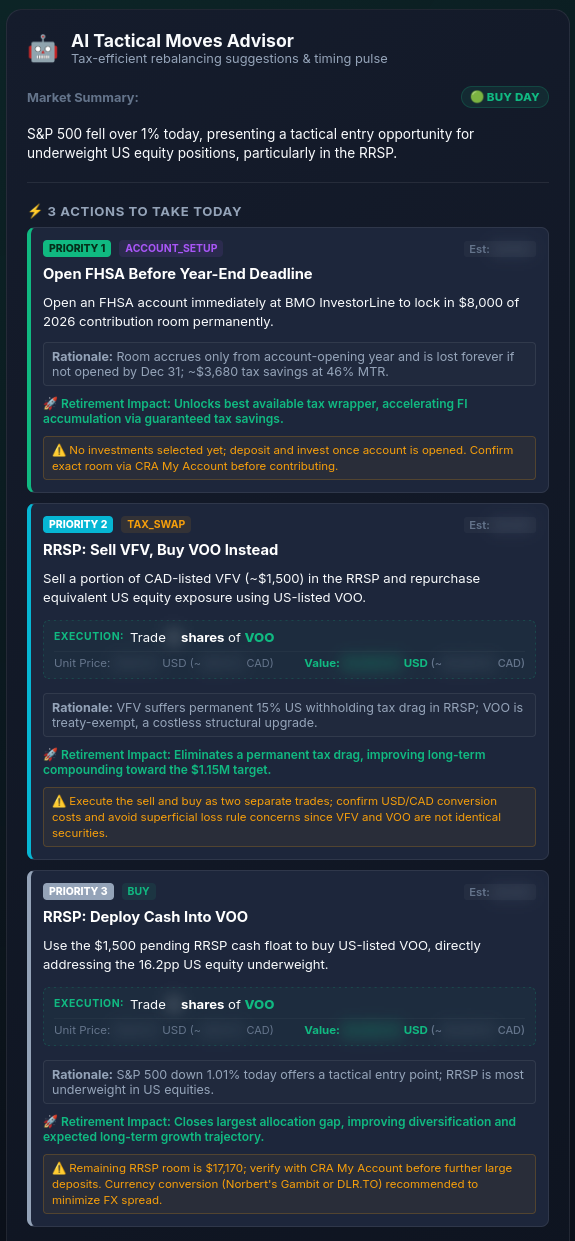
I realized early on that my financial strategy can’t be static. My risk tolerance at age 40 (aggressive wealth accumulation) is completely different from what it will be at age 55 (sequence of returns risk mitigation) or 71 (mandatory RRIF withdrawals).
Instead of letting a system prompt sit as an unmanaged block of text, I created a portfolio_prompt_evolution.md roadmap.
graph TD
    A["Phase 1 (Current): Accumulation<br>Aggressive Equities (90%+)"] --> B["Phase 2: Tax Optimization<br>Tax-Loss Harvesting & FHSA Maxing"]
    B --> C["Phase 3: Capital Protection<br>Sequence-of-Returns Guardrails"]
    C --> D["Phase 4: Pre-Retirement Runway<br>RRSP Meltdown & CPP Deferrals"]
    D --> E["Phase 5: Decumulation<br>Drawdown Sequencing & Income"]
Dual-Trigger Transitions
Most financial planners use basic age brackets. My prompt uses a dual-trigger phase transition:
- Net worth benchmarks: Governs portfolio strategy and accumulation urgency.
- Age / time milestones: Governs legal account rules (e.g. CPP, OAS, and RRIF locks).
It’s a simple, human-in-the-loop roadmap. When my portfolio balance or age crosses a milestone, I manually bump the prompt template in Git.
Enforcing Rules the LLM Can’t Guess
I inject strict Canadian tax constraints directly into the prompt as hard rules. For example, in Phase 1:
- The RRSP treaty exemption: The prompt explicitly forbids the AI from recommending Canadian-listed US index ETFs (like
VFVorZSP) in the RRSP wrapper. Instead, it must recommend US-listed equivalents (likeVOOorVTI) to capture the Canada-US tax treaty withholding tax exemption. - YNAB Surplus Integration: The prompt receives live YNAB metrics (fetched directly from the official YNAB API using a local access token). If my checking account holds cash exceeding a 6-month safety float, the AI is instructed to sound the alarm and prioritize deploying that surplus to buy underweight assets.
Rather than letting the app dynamically modify its own prompt on the fly, which introduces unpredictable drift, I manage these transitions as manual configuration bumps in Git. Since the advisor only outputs exactly three suggestions, I act as the final logic check for the financial advice before logging into my brokerage to execute them. The Git bump simply treats prompt templates exactly like configuration files, version-controlled and reviewed.
The Sane Developer
Building this way changes your relationship with the machine. Instead of navigating organizational process gates or waiting on consensus cycles, I spent my energy on:
- Designing security boundaries (guaranteeing my critical personal data never leaks past
localhost). - Calibrating prompt constraints (ensuring the model outputs 100% predictable JSON schemas).
- Code review (inspecting the CLI agent’s diffs to ensure database migrations were clean).
Building modern, local-first tools with harnessed agents isn’t just a productivity hack. It’s a reminder of the pure joy of writing software: high-velocity execution, total control of the stack, and the agency to build exactly what you need.
I wonder what problem I’ll have to solve next…